

Here you can buy XR-EASY and start using it quickly. Alternatively, you can test the software for free with our samples or for 14 days with a license by providing your business details.
Basic
For testing without a license or for quick participation in VR sessions.
Test with free CAD conversion
33% off
Studio
Recommended for building and space planning as well as product development.
$90$60 /month
per workstation with annual billing. Additional discounts for 3 or more licenses/year.
or test with free CAD conversion
33% off
Showroom
Recommended for sales and marketing of products that require explanation.
$367.50$245 /month
per workstation with annual billing. Additional discounts for 3 or more licenses/year.
or start a free 14-day trial
(verified companies only)
33% off
Pro
Recommended for design reviews and assembly planning in industrial engineering.
$735$490 /month
per workstation with annual billing. Additional discounts for 2 or more licenses/year.
or start a free 14-day trial
(verified companies only)
EXISTING USERS: Already purchased XR-EASY and want to upgrade or add more licenses? Please contact us here.
Get your 3D model converted
Please send us your 3D CAD file(s) (max 100mb) that you want to get converted to VR file(s) that can be used with XR-EASY. We will send you a download link for your converted file(s) within 24 hours.
You are currently viewing a placeholder content from HubSpot. To access the actual content, click the button below. Please note that doing so will share data with third-party providers.
More InformationStart your free 14-day trial today
You are currently viewing a placeholder content from HubSpot. To access the actual content, click the button below. Please note that doing so will share data with third-party providers.
More InformationTalk with us
You are currently viewing a placeholder content from HubSpot. To access the actual content, click the button below. Please note that doing so will share data with third-party providers.
More InformationGet in touch
You are currently viewing a placeholder content from HubSpot. To access the actual content, click the button below. Please note that doing so will share data with third-party providers.
More InformationXR-EASY for education institutions
We offer discounted PRO licenses for universities, vocational schools, and training areas (Education Edition/PRO EE). Please send us a message with your contact details.
XR-EASY for enterprise clients
We tailor our offering for global corporations or business groups that require more flexible PRO licensing models and/or an on-premise cloud across multiple departments and locations.
Compare licenses
For PRO, PRO EE or SHOWROOM license with CAD converter, the following native import file formats can be added (without guarantee, test run may be necessary): Catia (V4, V5+CGR or V6/3DX), Creo, Creo View, IFC, Inventor, JT, NX, Parasolid, PLMXML, Revit, Rhino/3dm, SolidEdge, SolidWorks, STEP (AP203, AP214, AP242)

If you don’t own VR hardware you can still host or join XR-EASY sessions in which other VR or desktop users can participate.
Desktop users appear as camera in the VR scene and move freely using the mouse and the WASD/Q/E keys.
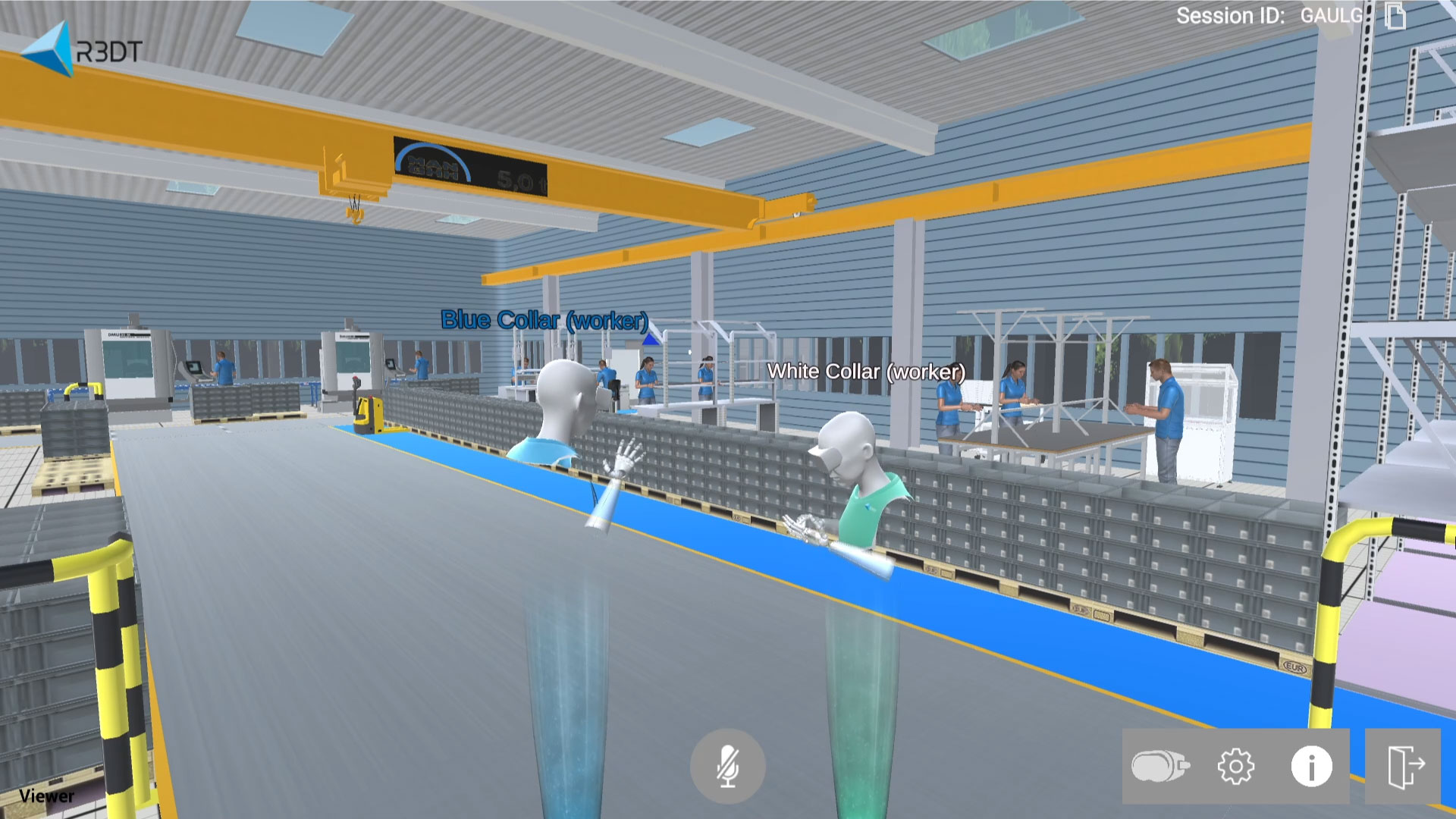
Together with colleagues and business partners, critical design reviews and virtual assembly processes are possible quickly and everywhere.
For example, an engineer in Asia could join a VR session with a developer in Europe and his boss in America. All three can see each other (as an avatar) and talk about the optimal installation.

XR-EASY can be operated with your bare hands – instead of standard controllers, which also work.

VR users could teleport freely through the virtual space.
Viewpoints can be set up in advance to improve the user experience, especially for untrained people.

At one click, 3D CAD files can be converted to XR-EASY by anyone. This automatically creates a virtual twin in our *.xvr format from the source file. During a VR session and when exiting, the twin can be saved and thus all changes backed up (*_autosave.xvr).

The working tools provide the following functions:
- Grab
- Pinch
- Scale
- Color
- Visibility
- Duplicate
- Reset
- Undo
- Redo
Additional native file formats can be added
- CATIA V4
- CATIA V5
- CATIA V6 / 3DExperience
- CATIA Graphical Representation
- Creo
- Creo View
- IFC
- Inventor
- JT
- NX
- Parasolid
- PLMXML
- Revit
- Rhino/3dm
- SolidEdge
- SolidWorks
- STEP (AP203, AP214, AP242)
Please contact us to discuss your specific needs.

The supporting functions include:
- Measurement
- Cross Section
- Screenshot
- Reference
- Process Documentation

The Assembly Tree shows the model structure as a list of the available components of the respective VR session, divided into assemblies containing individual parts or different (loaded) objects (individual models).

With process documentation, all changes made with the grab function are documented in writing and saved.
When the process documentation function is active, each pickup and drop of a part/assembly with the grab function is documented. Immediately after deactivating the function, a folder with an HTML file is created in a directory of the XR-EASY folder.
The respective document contains video recordings as well as duration and distances of the successively executed actions and can be accessed on all common browsers.

With the Ergo Check module, work situations and assembly processes can be objectively examined and evaluated for their ergonomics to optimize the planned project.
The Ergo Check allows to put oneself in the position of affected workers and analyze all kind of activities. Grab and reach zones together with fields of view play an important role when it comes to safe and healthy ergonomics.
The settings fit any person. But moreover, you can equally learn about the perspective of smaller or larger people via the percentiles.
What can we offer you?
- XR-EASY bundles
- Native CAD conversion
- Coop-in-VR cloud
- On-premise cloud
- Global VR sessions
- Education edition
- Soft/hardware packages
- Gaming PCs
- VR headsets
- Handtracking bundles
- Floating license models
- Group discount
- SME offerings
- Extended trials
- Thesis proposals
- Experience sets
- Anything forgotten?
Please contact us to discuss your specific needs.
Enthusiastic users worldwide
Be inspired by XR-EASY in engineering, planning or sales and simplify your workday with VR.







“The VR system is unique: there is zero additional effort required for the 3D presentation of plans. And for clients, approving designs through a VR headset is even easier!”

Martin Effenberg
EFFENBERG Holz Design Wohnen (Space planning)
“XR-EASY takes the interaction between salespeople and customers to a new level, providing added value when closing any deal!”

Holger Herrmann
HAMMES|Software GmbH (Marketing)
“The VR tool actually provides a sense of tactile feedback during the planning process, especially during the ergonomics check.”
Michael Mohren
DEHN SE (Work system and factory planning)
Frequently Asked Questions
XR-EASY is the most user-friendly Virtual Reality (VR) software for industrial engineering. The innovative technology for working with virtual prototypes is used along the entire development process. Particular attention is paid to planning errors that are difficult to identify without VR.
Our customers’ applications include work and assembly planning, ergonomics study, determination of assembly sequences, overall production and layout planning, special machinery and plant construction as well as technical purchasing and sales.
Overall, the development and planning phases are shortened. Elaborate mockups and real prototypes become superfluous. The bottom line is that companies save a lot of time and money.
XR-EASY is started and operated by users themselves, anywhere and at any time within a few minutes. So, anyone can automatically generate virtual prototypes from 3D CAD data at the push of a button. Immediately afterwards, with VR glasses and your bare hands (instead of annoying controllers, which you can however also use), you can work virtually at planned workstations, production lines or machines, or you present in a 360-degree all-round view.
Together with co-workers and business partners, critical design reviews and virtual assembly processes become possible quickly and anywhere. Ergonomics checks can also be carried out at a very early stage in order to assess the physical stress situation at the respective workplace.
XR-EASY basically supports all common 3D-CAD file formats. The possibilities essentially depend on the structure and the number of polygons, less on the file size. The performance of the VR hardware is also crucial.
The PRO Edition of XR-EASY offers a fully automated CAD-to-VR converter for importing the standard data exchange formats STEP (AP203, AP214, AP242), JT and OBJ. Other native formats from the CAD providers Catia, Creo, NX, Solidworks and others can also be booked.
VR-enabled gaming hardware is widely available and includes a Windows PC (laptop or desktop) and a suitable VR headset. Together with a leap motion sensor for hand tracking, you can safely omit the controllers.
Either you or your IT partner set up the VR tool and install the XR-EASY “EXE”. After that simply upload your CAD data and start in VR without training!
You can test the VR software extensively in advance. You can download the license-free BASIC Edition here for free and get started.
In the operational environment, you can also test your own models in VR. You can send us your 3D CAD models and contact details here.
If the file/s meet the requirements, we will send you a link to download the converted VR models within 24 hours on weekdays.
Professional interested parties can also arrange a 14-day test phase with a full license in order to be able to comprehensively test the PRO Edition independently.
The VR software is used by XR-EASY users worldwide with a wide variety of VR hardware. As a VR tool, this also works in very restrictive corporate IT environments. The benefit of the VR tool is already high at a single workstation that is not connected to a network.
Many users connect to the outside world via the Internet (company or guest WLAN) to collaborate with colleagues and business partners. An open CLOUD solution is used, for which IT ports may have to be activated. Unauthorized participation by third parties with the appropriate CAD model is in principle impossible.
If necessary, global companies can still book an on-premise CLOUD solution with the highest security standards across different areas and locations.
Setting up a VR tool requires only minimal IT knowledge. The installation instructions and video tutorials provided by the vendors are easy to understand.
XR-EASY users also have access to a detailed knowledge base. You can contact our team any time by submitting a support request.
In short: you can do it on your own, and we’ll support you along the way 😉